

Modern classrooms increasingly rely on assistive technology (AT)—a transformative toolkit revolutionizing inclusive education. By definition, these devices, software, and adaptive tools empower students with disabilities to overcome barriers like dyslexia or physical impairments. From no-tech solutions like raised line paper for handwriting challenges to digital text-to-speech platforms for visual impairments, AT bridges learning gaps while fostering independence.
Educators witness daily how simple grip strengtheners enable motor-skills practice or noise-canceling headphones minimize sensory overload—small adaptations with monumental impacts. When implementing AT, teachers create classrooms where participation isn’t dictated by ability but supported through innovation. By prioritizing accessibility and inclusion, schools ensure students not only meet benchmarks but exceed them with confidence. Ready to explore these tools in depth? Let’s dive into actionable AT implementations next.
Different Assistive Technology Solutions for Inclusive Classrooms
In today’s classrooms, three main assistive technology categories support diverse learners: Low-Tech AT, High-Tech AT, and adaptive Digital AT solutions. These tools bridge accessibility gaps for students with visual impairments, dyslexia, fine motor challenges, and other needs.
Low-Tech AT offers immediate, non-electronic support:
- Pencil grips improve handwriting stability.
- Colored overlays reduce visual stress during reading.
- Raised line paper provides tactile feedback.
These cost-effective tools demonstrate that accessibility doesn’t require complexity; therefore, teachers often introduce them as initial solutions.
High-Tech AT enhances learning with advanced tools:
- Screen readers convert text to audio for navigation.
- Speech-to-text software supports students with mobility limitations.
- Adaptive keyboards enable customization for physical disabilities.
Quick tip: Speech recognition programs can reduce writing frustration for students with motor skill impairments (ASHA Research 2023).
Digital AT builds flexibility through apps and software, offering:
- Adjustable color contrast settings.
- Dynamic text resizing.
- Multi-sensory formatting options.
Tool TypeExampleSupported Need
- Text-to-SpeechRead&WriteDyslexia/Visual Impairment
- InteractiveSmartboard MindmapsADHD Focus
- CommunicationTobii Dynavox SGDNonverbal Students
“A tablet with magnification features helped my legally blind student read diagrams independently for the first time” – Sarah Thompson, Elementary SPED Teacher.
Having explored specific solutions, let’s examine how these technologies translate into measurable academic outcomes…
Facilitating Inclusion with Assistive Technology
While scrolling through today’s classrooms, you’ll notice how assistive technology breaks barriers that once silenced participation. Through adaptive tools addressing visual impairments, ADHD focus challenges, and physical limitations, students engage directly through screen readers and switch controls that transform “I can’t” into “Now I can.” These innovations do more than accommodate – they boost confidence by proving abilities outweigh disabilities.
This newfound participation directly drives outcomes. Consider how audiobooks help dyslexic learners match peers’ reading pace, allowing them to contribute insights during discussions instead of staying silent. Meanwhile, students using augmented communication devices shift from isolated observers to active team members in collaborative projects. Each tool bridges ability gaps through academic support and peer connection.
Independence emerges as students navigate assignments via customized solutions:
- Graphic organizers replace teacher prompts for ADHD task management
- Voice dictation software bypasses illegible handwriting frustrations
- Tactile diagrams deliver independence through touch instead of vision
Such tailored approaches demonstrate how accessibility evolves beyond legal checkboxes. They empower learners to own their path by providing precisely calibrated supports that address specific needs without fostering dependency. Educators report students persisting through challenges when using tools matched to their strengths.
Ultimately, The Power of Assistive Technology: Making Classrooms More Inclusive manifests through these cumulative benefits:
Enhanced Independence: Students direct their learning path
Social Inclusion: Communication bridges peer relationships
Personalized Access: Tools adapt to learning differences
Having explored these transformational impacts, let’s shift our focus to daily implementation. The following section provides actionable strategies to seamlessly integrate these resources within your existing curriculum, empowering every classroom to become an inclusive ecosystem of achievement.
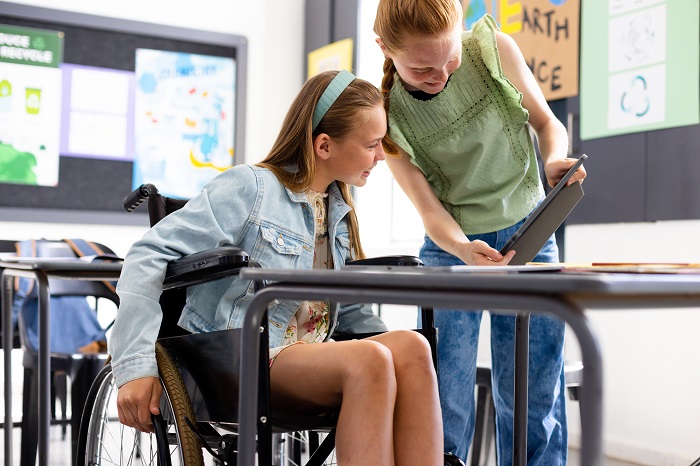
Strategies for Implementing Assistive Technology in Schools
To harness The Power of Assistive Technology: Making Classrooms More Inclusive, begin by evaluating students’ unique physical, cognitive, and educational profiles. Understanding whether learners face visual impairments, dyslexia coordination challenges, or other barriers determines effective tool selection, much like choosing prescription lenses tailored to specific vision needs.
Teachers, Special Education Teachers, Occupational Therapists, and Speech-Language Pathologists should collaborate closely during AT planning sessions. For example, therapists might recommend grip-strengthened writing tools, while speech experts propose text prediction software – ensuring comprehensive support across disciplines. Implement these practical solutions:
- Enable closed captioning during video lessons for auditory/visual reinforcement
- Deploy text-to-speech software for reading accommodation
- Customize graphic organizers for visual concept mapping
- Utilize visual timers through apps or physical devices
School systems strengthen implementation by offering:
- Annual training programs for new AT platforms
- Resource-sharing partnerships with district AT specialists
- IDEA-aligned funding for sustainable tech acquisition
Collaborative Implementation flourishes when educators partner with IEP teams to assess effectiveness during quarterly reviews – a process bolstered by guidance from professional organizations like RESNA. If budget constraints challenge your school:
- Investigate IDEA funding streams first
- Integrate free accessibility features within standard software
- Establish phased tech adoption timelines
“Effective Assistive Technology implementation requires continuous collaboration between educators, specialists, and families – much like a three-legged stool requires all supports to function,” notes AT coordinator Emily Rodriguez.
When schools combine specialized expertise with structured support frameworks, AT becomes more than tools – it evolves into transformational learning partnerships. Next, we explore how innovative developments will further push accessibility, redefining inclusive education’s future landscape.
Read More : Hybrid Learning Explained: Benefits, Challenges, and Best Practices for a Balanced Education
Shaping the Future of Education with Assistive Technology
The Power of Assistive Technology: Making Classrooms More Inclusive lies in its ability to revolutionize learning dynamics through adaptive tools supporting diverse abilities. As educators, you’ll discover how emerging technologies create personalized pathways to inclusion, guided by frameworks like Universal Design for Learning (UDL). These approaches foster adaptable environments where tactile diagrams, voice recognition software, and adjustable interfaces empower students to engage authentically with curriculum content.
By embracing UDL principles – multiple engagement modes, content representations, and expression formats – your classroom becomes an accessibility model. For students with disabilities, AT transforms challenges into springboards for independence through:
- Customizable learning tools adapting to visual, cognitive, or physical needs
- Interactive platforms facilitating collaborative problem-solving
- Real-time feedback systems boosting academic confidence
“These innovations aren’t just accommodations,” observes an education specialist. They’re bridges connecting students to their fullest academic potential.” When schools implement AT with foresight – per UNESCO and the Salamanca Statement – they build equitable systems where technology nurtures lifelong independence rather than temporary solutions.
Prioritizing accessibility today seeds tomorrow’s inclusive classrooms. Let’s build ecosystems where all learners thrive – one adapted tool, one empowered educator, one barrier-free lesson at a time.